New in LarAgent: Automatic Provider Failover and Smarter Tool Development
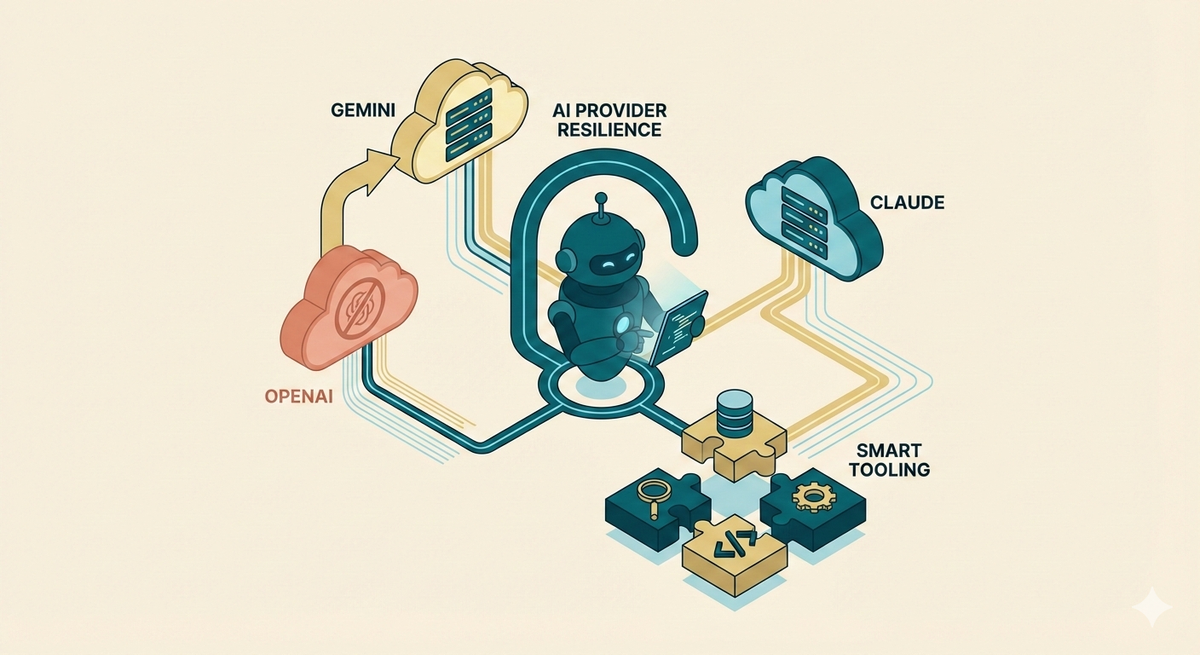
LarAgent v1.0 marked the package as production-ready. Now, v1.1 and v1.2 push things further — with automatic provider failover, smarter tool development using DataModels, and flexible identity management for multi-tenant apps.
Let's dive into what's new.
🔄 Multi-Provider Fallback
What happens when OpenAI goes down or you hit a rate limit? Before v1.2, your agent would fail to single, global fallback provider. Now, LarAgent automatically switches to the next provider in your list.
How it works
Define multiple providers in order of preference — first is primary, others are fallbacks:
class MyAgent extends Agent
{
    protected $provider = ['openai', 'gemini', 'claude'];

    public function instructions()
    {
        return 'You are a helpful assistant.';
    }
}
Need different settings per provider? No problem:
class MyAgent extends Agent
{
    protected $provider = [
        'openai',
        'gemini' => ['model' => 'gemini-2.0-flash'],
        'claude',
    ];
}
Or set it globally in config/laragent.php:
'default_providers' => [
    'openai',
    'gemini' => ['model' => 'gemini-2.0-flash'],
    'claude',
],
For debugging, use getProviderSequence() to see the fallback order and getActiveProviderName() to check which provider is currently active.
👉 Learn more about provider configuration: https://docs.laragent.ai/v1/agents/llm-drivers#configuration
🛠️ Enhanced DataModel Support in Tools
v1.2 makes it much easier to work with complex, structured inputs in your tools. You can now use DataModels directly — no more manual array parsing.
Use DataModel as a property type
Pass DataModel classes directly to addProperty():
$tool = Tool::create('schedule_meeting', 'Schedule a meeting')
    ->addProperty('title', 'string', 'Meeting title')
    ->addProperty('attendee', PersonDataModel::class)
    ->addProperty('location', AddressDataModel::class)
    ->setRequired(['title', 'attendee', 'location'])
    ->setCallback(function (string $title, PersonDataModel $attendee, AddressDataModel $location) {
        return "Meeting '{$title}' scheduled with {$attendee->name} at {$location->city}";
    });
👉 More on inline tools: https://docs.laragent.ai/v1/tools/other-tools#inline-tools
Use entire DataModel as tool schema
The new addDataModelAsProperties() method uses a DataModel as your complete tool input:
class TaskDataModel extends DataModel
{
    public string $title;
    public int $estimatedHours;
    public ?string $description = null;
}

$tool = Tool::create('create_task', 'Create a task')
    ->addDataModelAsProperties(TaskDataModel::class)
    ->setCallback(function (TaskDataModel $task) {
        return "Task '{$task->title}' created with {$task->estimatedHours} hours.";
    });
Class-based tools with $dataModelClass
For class-based tools, set the $dataModelClass property and receive a typed DataModel in handle():
class CreateTaskTool extends Tool
{
    protected string $name = 'create_task';
    protected string $description = 'Create a new task';
    protected ?string $dataModelClass = TaskDataModel::class;

    protected function handle(array|DataModel $input): mixed
    {
        $task = $input; // Already a TaskDataModel instance
        return "Task '{$task->title}' created.";
    }
}
Tool stubs now generate handle() instead of execute(), but both still work for backward compatibility.
👉 More on tool classes: https://docs.laragent.ai/v1/tools/other-tools#tool-classes
💡 You can also define tools using PHP attributes. Learn more: https://docs.laragent.ai/v1/tools/attribute-tools
🎯 Structured Output for Claude
Claude now supports structured output with response schemas — matching what OpenAI and Gemini already offered. If you're using Anthropic models, you can now get schema-validated JSON responses:
class PersonExtractor extends Agent
{
    protected $provider = 'claude';
    protected $responseSchema = PersonData::class;
}

$data = PersonExtractor::make()->respond('John Smith is 35 and lives in NYC');
$data->toArray();
// Returns: ['name' => 'John Smith', 'age' => 35, 'city' => 'NYC']
Since Anthropic released structured output in Nov 2025, this become a highly requested feature for teams using Claude as their primary provider.
💡 DataModel is versatile — use it for structured outputs, tool parameters, or agent storage. Learn more: https://docs.laragent.ai/v1/context/data-model
⏱️ Response Time Visibility
The agent:chat command now shows how long each response takes:
TestAgent:
Hello! How can I help you today?

Response completed in 1.35 seconds.

You:
Sub-second responses display in milliseconds, longer ones in seconds. Small feature, but useful when debugging latency or comparing provider performance.
🔐 Custom Storage Identity Overrides
Building a multi-tenant app? You can now override how LarAgent identifies chat history and usage tracking sessions.
Share chat history across a team:
class TeamAgent extends Agent
{
    protected function createHistoryIdentity(): SessionIdentity
    {
        return new SessionIdentity(
            agentName: $this->name(),
            chatName: $this->getTeamId(),
        );
    }
}
Or use different scopes for history vs. usage tracking:
class DualIdentityAgent extends Agent
{
    protected function createHistoryIdentity(): SessionIdentity
    {
        return new SessionIdentity(
            agentName: $this->name(),
            chatName: 'team-' . $this->getTeamId(),
        );
    }

    protected function createUsageIdentity(): SessionIdentity
    {
        return new SessionIdentity(
            agentName: $this->name(),
            chatName: 'org-' . $this->getOrganizationId(),
        );
    }
}
This unlocks patterns like team-shared conversations with organization-level billing.
🔧 Optional Migration Notes
No breaking changes — your existing code will continue to work. A few things to know:
Tool methods: New tool stubs use handle() instead of execute(). Both work, but handle() gives you automatic DataModel conversion:
// Old (still works)
public function execute(array $input): mixed

// New (recommended)
protected function handle(array|DataModel $input): mixed
Provider fallback config: The fallback_provider config option is deprecated. Use default_providers array or the agent-level $provider array instead.
Summary
LarAgent v1.1 and v1.2 bring meaningful improvements to reliability and developer experience:
- 🔄 Multi-provider failover keeps your agents running when providers fail
- 🛠️ DataModel integration in tools makes complex inputs type-safe and cleaner
- 🎯 Claude structured output completes provider feature parity
- ⏱️ Response timing helps debug performance issues
- 🔐 Identity overrides unlock multi-tenant and enterprise patterns
Update to v1.2.0 and take advantage of these features in your Laravel AI applications.
Happy coding! 🚀